
💳 How to Order a Stripe M2 Card Reader
If your organization uses BidKit Payments, you can order a Stripe M2 card reader directly Stripe through your event admin. The order form is embedded right in your Auction Settings, and the reader ships directly to your organization from Stripe.
🚨If your organization is tax exempt, submit your exemption certificate to Stripe Support before purchasing your M2 card reader. If you have already purchased and were charged tax, you can request a refund from Stripe. For more information click here: How to Apply a Tax Exemption for Stripe M2 Terminal Hardware Orders
🛒 Step 1: Open the Order Form
- Log in to your ClickBid admin.
- In the left navigation, click Software Settings> Auction Settings.
- Scroll down to the Payment section and expand it.
- Look for the line that reads "Need a card reader for tap, chip, or swipe payments?"
- Click Order a Stripe Card Reader.
The Stripe order form will load directly on the page.
📦 Step 2: Choose What to Order
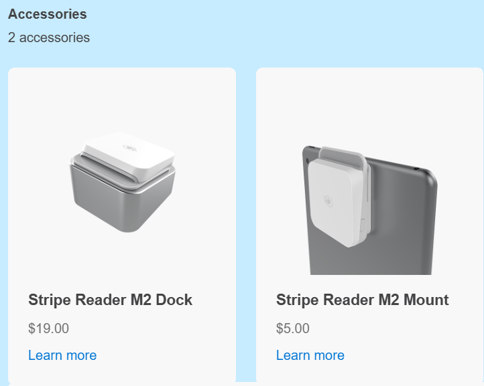
The order form offers individual items. You can order just the reader, or add the dock and mount for a complete setup.
| Item | Price |
|---|---|
| Stripe Reader M2 | $59.00 |
| Stripe Reader M2 Dock | $19.00 |
| Stripe Reader M2 Mount | $5.00 |
ℹ️The dock charges your M2 reader and keeps it secure at a fixed station. The mount attaches the reader to a tablet or stand. Neither is required to use the reader, but both are helpful for high-volume check-in stations.
Adjust quantities as needed if you are ordering multiple readers.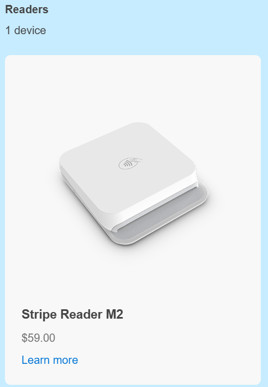
🛍️ Step 3: Review Your Cart
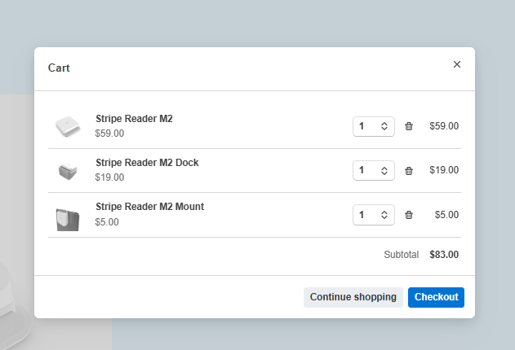
Before proceeding to checkout, a Cart summary will appear showing your selected items and subtotal.
- Use the up and down arrows next to each item to adjust the quantity.
- Click the trash icon to remove an item you no longer want.
- Click Continue shopping to go back and make changes to your order.
- When everything looks right, click Checkout to move on.
📬 Step 4: Enter Your Shipping Information
- Enter your Company name.
- Enter the Email address where you want your order confirmation sent.
- Fill in the Full name and shipping address for delivery.
⚠️ Stripe requires a physical address. PO boxes are not accepted.
🚚 Step 5: Choose a Shipping Method
Use the Shipping method dropdown to select your preferred speed. Three options are available:
- Standard Shipping: 3 to 7 business days
- Express Shipping: 1 to 3 business days.
- Priority Shipping: 1 to 2 business days
Shipping cost is calculated based on your address and will display once the form is complete.
⚠️ Estimated shipping times are not guaranteed. Once your order leaves the warehouse, outside factors like carrier delays, weather, or high shipping volumes can affect delivery. We strongly recommend ordering your reader well in advance of your event, don't wait until the last minute.
ℹ️ Shipping fees are shown before you confirm your order. If you need your reader by a specific event date, factor in a few days for setup and pairing before selecting your shipping speed.
💳 Step 6: Enter Payment Information
- Enter your Card number, expiration date (MM/YY), and security code.
- If your billing address is the same as your shipping address, leave Billing is same as shipping information checked.
- If your billing address is different, uncheck that box and enter your billing address.
✅ Step 7: Place Your Order
- Review your order summary on the left, confirm items, quantities, and total.
- Click the button to place your order.
- Watch for a confirmation email at the address you entered in Step 3.
ℹ️ Once your order has shipped you will receive a confirmation email with all the tracking information you need. Please note that orders are fulfilled through Stripe's distribution partner. If you have any questions please reach out directly at Stripe's Support page
🚨Under the Orders section: This page displays all orders processed through your Organization's connected merchant account, including orders from all connected events.
💡Please note that if you cancel your order before it ships and Stipe approves the cancelation, your refund will be processed within 5 to 10 business days.
🔧 What's Next?
Once your reader arrives, you'll need to pair it with the BidKit Payments app before your event. See How to Set Up and Use BidKit Payments with the M2 Card Reader for step-by-step pairing instructions.