
If your organization is a registered non-profit, you may be eligible to have sales tax waived on Stripe Terminal hardware orders, such as the M2 card reader. This process is handled directly with Stripe and requires submitting your state sales tax exemption certificate. This article walks through exactly what to do.
⚠️If your organization is tax exempt, submit your exemption certificate to Stripe Support before purchasing your M2 card reader by following the steps below. If you have already purchased and were charged tax, you can request a refund by following the Step 2. below.
ℹ️ This process applies per account. Each non-profit organization needs to submit its own exemption certificate to Stripe. Exemption rules are also state-specific, so not every state grants blanket sales tax exemption to non-profits.
📋 Before You Start
Make sure you have the following ready before reaching out to Stripe:
Your state sales tax exemption certificate: this must be for the state that matches the shipping address on your hardware order. A 501(c)(3) IRS determination letter alone may not be enough. Many states require a separate state-level exemption form in addition to or instead of the federal determination letter.
Your Stripe account information: the legal entity name and business address on your Stripe account should match what appears on your exemption certificate. If they do not match, Stripe may not be able to process the exemption.
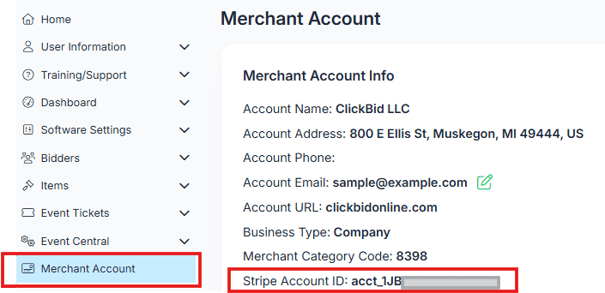
Your Stripe account ID: Go to the Merchant Account tab in your Event. Your Stripe Account ID will be displayed on that page.
🚨 Important: Only use the Stripe Account ID displayed in the Merchant Account section of your event. If you have multiple Stripe accounts and submit the wrong Account ID, it may delay the approval of your tax-exempt request.
If you are having trouble contacting Stripe Support to submit your tax-exempt forms, please reach out to our Accounting team at accounting@clickbidonline.com. They can submit the forms to Stripe on your behalf. Be sure to provide all of the information and documentation requested so they can process your request without delays.
📧 Step 1: Submit Your Certificate to Stripe Support
Email support@stripe.com with the following information:
- Include your Organization Name & Shipping State
- Your Stripe account ID
- Your signed & dated exemption certificate as a PDF attachment
- A written request to apply the exemption to future Terminal hardware orders
- Wait for Stripe’s confirmation that the exemption has been approved before placing the order, if avoiding tax at checkout is important.
ℹ️ If your state's exemption form requires a seller name, use: Stripe, Inc., 354 Oyster Point Blvd, South San Francisco, CA 94080
💰 Step 2: Request a Refund for Past Orders (If Applicable)
If sales tax was already charged on a previous hardware order, you can request a refund in the same email. Include the following in your support request:
- The order number(s) for any past orders where tax was charged
- The corresponding invoice(s)
Stripe will review your request and issue a refund for the tax amount on those orders if your exemption is approved.
✅ What Happens Next
Stripe will review your submission and confirm once the exemption has been applied to your account. Once approved, future Terminal hardware orders placed through your Stripe account will not be charged sales tax.
💡 Keep a copy of your submitted exemption certificate and the confirmation from Stripe for your records. If your exemption certificate has an expiration date, you will need to resubmit when it expires.
🚨 Stripe generally reviews complete requests within 2–5 business days, although that is an estimate rather than a guaranteed turnaround time. If tax is still showing after a request has been submitted, it may mean the exemption is still under review or has not yet been applied to the embedded ordering experience.
ℹ️ Things to Keep in Mind
Each non-profit organization must submit its own certificate, this cannot be done as a group submission on behalf of multiple accounts. If your organization operates in multiple states or ships hardware to different states, you may need separate exemption certificates for each state. When in doubt, check with your state's department of revenue or a tax advisor for guidance on what your state requires.