---
title: "🧭First Steps: Ticket Page, Landing Page, and Donation Page "
description: Learn how to set up your Landing Page, Ticket Page, and Donation Page in ClickBid’s Virtual Venue. This guide covers key features, settings, and best practices to get your event up and running quickly.
---
[Skip to content](https://support.cbo.io/first-steps-ticket-page-landing-page-and-donation-page-in-vv#main-content)

- [Blog](https://blog.cbo.io/)
- [ClickBid Admin](https://cbo.io/admin/login.php)
Open main navigation
Close main navigation
- [Blog](https://blog.cbo.io/)
- [ClickBid Admin](https://cbo.io/admin/login.php)
- [View our Training Videos](https://training.clickbidonline.com/all-courses/)
[View our Training Videos](https://training.clickbidonline.com/all-courses/)
Welcome to ClickBid's Knowledge Base
- There are no suggestions because the search field is empty.
1. [ClickBid How To Articles](https://support.cbo.io/?hsLang=en)
2. [Get Started](https://support.cbo.io/get-started?hsLang=en)
3. [Pre-Event Prep](https://support.cbo.io/get-started?hsLang=en#pre-event-prep)
# 🧭First Steps: Ticket Page, Landing Page, and Donation Page
#### Before diving into the details of your auction or fundraising efforts, it’s a good idea to get your core event pages in place. Setting up your Landing Page, Ticket Page, and Donation Page early ensures your guests can register, purchase tickets, and start supporting your event right away.
### 🎯 Landing Page Setup
Your **Landing Page** is the first thing guests see when they access your event. It includes registration and login options, and can link to tickets, donations, and auction items.
#### ⚙️ How to Set Up Your Landing Page
1. Go to **Software Settings \> Landing Page Builder.** Review the following tutorial videos on basic landing page setup components:
1. Landing Page Builder Settings[](https://training.clickbidonline.com/courses/new-features/lessons/landing-page-builder-settings/)
2. **Hero Banner Settings**
3. **Content Blocks**
4. **Navigation & Action Bars**
2. **Event Start**: You can allow guests to log in and bid **before** the official event start time. Your event can be opened early under the Settings in the Landing Page Builder.
- - If your event is set to open/yes and items are marked as **Active**, guests will be able to bid.
🚧 **Caution:** Make sure item statuses are correct to avoid accidental early bidding.
3. Customize the page by adding **content blocks** and setting up your **hero banner** area.
You can begin sharing your Landing Page URL as soon as you are ready to go live!
For more information on Landing Page Builder [click this link](https://support.cbo.io/how-to-use-the-landing-page-builder-in-clickbid?hsLang=en)
---
### 🎟️ Ticket Page Setup
This is where you’ll create and manage tickets, sponsorships, and underwriting options for your event.
#### ➕ How to Add Tickets
1. Go to **Event Tickets \> Tix \> Modify Tickets**.
2. Create all necessary ticket types (individual, sponsorship, underwriting).
#### ⚙️ How to Configure the Ticket Page
1. Go to **Event Tickets \> Tix \> Ticket Page Settings**.
2. Review and adjust the following sections:
- **General Settings**: Let guests store credit cards, set the display order, and allow guest updates.
**ℹ️ Info:** Allowing guests updates will send the purchaser an automatic second email that allows them to enter in guest information after the sale.
- **Venue Information:** Enter venue information to display on the front page of the ticketing site.
- **Payment Types**: Enable credit card, cash, and check payment options.
**ℹ️ Info:** If you don't want to allow check or cash payments on the ticket page, use the RSVP page instead. It’s for backend use and supports all payment types and invisible tickets.
- **Additional Features**: Show QR codes, customize titles, select quantity or donation items.
- **Customizable Content**: Update receipt headers/footers, customize email messages, and add text to the front page on the ticketing site.
**ℹ️ Info:** Your logo will appear on the ticketing site's front page when uploaded under **Software Settings \> Event Settings \> Logo**.
---
### 💰 Donation Page Setup
Enable your guests to support your cause by donating online or via text-to-give.
#### ➕ How to Set Up the Donation Page
1. Go to **Software Settings \> Landing Page Builder \> Settings \> Navigation Settings \> Show Donate Link? \> Yes.**
**ℹ️ Info: For step-by-step instructions on setting up donations and Text-to-Give, [click here](https://support.cbo.io/donation/text-to-give?hsLang=en).**
#### 👥 How Guests Access the Donation Page
- Guests can text your **keyword to 855-800-4975**, then follow the donation link.
- The **Donate Tab** on your **Landing Page navigation** also leads here.
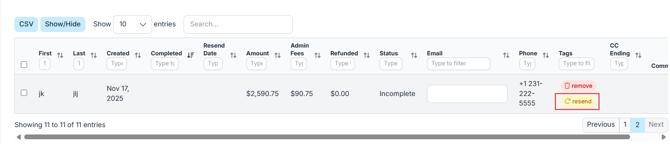
**To view donations**:
- **Go to Donations/Text-to-Give \> Manage Donations** to view donations and send a message to donors that didn't complete their donation.
---
### ⚙️ Auction Settings
This section lets you customize how your auction behaves and how bidders interact with it.
#### 🔁 General Event Settings
1. Go to **Software Settings \> Auction Settings**.
2. In the **General Event Details** tab:
- Set your event start time.
- Enable **Max Bidding** (guests set their max bid and the system auto-bids for them).
#### 👥 Bidder Settings
- Enable registration, mobile check-in, and **text-to-register**.
**💡Tip:** Text to register will ask if bidders want to donate or register for the auction first.
- Require address/credit card.
- Set a **starting bidder number** for self-registration.
- Customize your **welcome email** for new bidders.
**💡Tip:** Welcome emails are only sent when a guest registers themselves as a bidder. Bidders do **not** receive this message if a bidder list is uploaded or when a ticket is purchased.
#### 🛎️ Butler Settings
- Create a **custom welcome message** sent after registration.
**ℹ️ Info:** Use the \[u\] short code to include each guest’s **unique bidding URL**.
If you’re selling tickets, this message won’t automatically send when converting guests to bidders.
#### 💳 Payment Settings
- Enable/adjust **credit card fees** (suggested: **3.63%**).
- Let guests **opt out of fees** or make it a **requirement.**
- Decide whether to allow **checkout via phone**.
🚧 **Caution:** You **must** allow check out from phone in order for the automatic winning message to go out to your silent auction winnining bidders.
#### 🧾 FMV & Custom Content
- Show **FMV (Fair Market Value)** on receipts for tax purposes.
- Add a **statement footer** and set terms.
**ℹ️ Info:** Include your **Tax ID** in the footer for donor receipts.
### 💳 Enable Credit Card Processing
To allow guests to pay with cards, you’ll need to set up your **Merchant Account**.
#### ⚙️ How to Register a Merchant Account
1. Go to **Software Settings \> Auction Settings \> Payment \> Merchant Registration**.
2. Follow the steps to enable your credit card processing capabilities.
**💡Tip:** This setup is required before any guests can pay online with a credit card or register their card.
- [Account & Setup](https://support.cbo.io/account-setup?hsLang=en#main-content)
- [Users & Logging In](https://support.cbo.io/account-setup?hsLang=en#users-logging-in)
- [Billing/Renewal](https://support.cbo.io/account-setup?hsLang=en#billing-renewal)
- [Organization Account](https://support.cbo.io/account-setup?hsLang=en#organization-account)
- [Event Settings](https://support.cbo.io/account-setup?hsLang=en#event-settings)
- [Auction Settings](https://support.cbo.io/account-setup?hsLang=en#auction-settings)
- [Welcome Page](https://support.cbo.io/account-setup?hsLang=en#welcome-page)
- [Get Started](https://support.cbo.io/get-started?hsLang=en#main-content)
- [Pre-Event Prep](https://support.cbo.io/get-started?hsLang=en#pre-event-prep)
- [Creating a New Event](https://support.cbo.io/get-started?hsLang=en#creating-a-new-event)
- [Event Day Toolkit](https://support.cbo.io/event-day-toolkit?hsLang=en#main-content)
- [Paddle Raise](https://support.cbo.io/event-day-toolkit?hsLang=en#paddle-raise)
- [Live Auction](https://support.cbo.io/event-day-toolkit?hsLang=en#live-auction)
- [Silent Auction](https://support.cbo.io/event-day-toolkit?hsLang=en#silent-auction)
- [Butler](https://support.cbo.io/event-day-toolkit?hsLang=en#butler)
- [Volunteer Training](https://support.cbo.io/event-day-toolkit?hsLang=en#volunteer-training)
- [Messaging](https://support.cbo.io/messaging?hsLang=en#main-content)
- [Text & Emails](https://support.cbo.io/messaging?hsLang=en#text-emails)
- [Chat Bidders](https://support.cbo.io/messaging?hsLang=en#chat-bidders)
- [Welcome Text, Text Bidders, & Email Bidders](https://support.cbo.io/messaging?hsLang=en#welcome-text-text-bidders-email-bidders)
- [Tickets & Sponsorships](https://support.cbo.io/tickets-sponsorships?hsLang=en#main-content)
- [Tickets, Sponsorships & Underwriting Overview](https://support.cbo.io/tickets-sponsorships?hsLang=en#tickets-sponsorships-underwriting-overview)
- [Reporting & Data](https://support.cbo.io/tickets-sponsorships?hsLang=en#reporting-data)
- [Manage Ticketed Guests](https://support.cbo.io/tickets-sponsorships?hsLang=en#manage-ticketed-guests)
- [RSVP & Invoicing](https://support.cbo.io/tickets-sponsorships?hsLang=en#rsvp-invoicing)
- [Items](https://support.cbo.io/items?hsLang=en#main-content)
- [Items Overview & Setup](https://support.cbo.io/items?hsLang=en#items-overview-setup)
- [Quantity Items / E-Commerce](https://support.cbo.io/items?hsLang=en#quantity-items-e-commerce)
- [Item Donation Form and Donors](https://support.cbo.io/items?hsLang=en#item-donation-form-and-donors)
- [FMV & Tax](https://support.cbo.io/items?hsLang=en#fmv-tax)
- [Peer to Peer and Donation Campaigns](https://support.cbo.io/peer-to-peer-and-donation-campaigns?hsLang=en#main-content)
- [Peer to Peer and Donation Setup](https://support.cbo.io/peer-to-peer-and-donation-campaigns?hsLang=en#peer-to-peer-and-donation-setup)
- [Recurring Donations](https://support.cbo.io/peer-to-peer-and-donation-campaigns?hsLang=en#recurring-donations)
- [Text to Give](https://support.cbo.io/peer-to-peer-and-donation-campaigns?hsLang=en#text-to-give)
- [Embed Your Donation Form](https://support.cbo.io/peer-to-peer-and-donation-campaigns?hsLang=en#embed-your-donation-form)
- [Appeal Display](https://support.cbo.io/peer-to-peer-and-donation-campaigns?hsLang=en#appeal-display)
- [Bidders](https://support.cbo.io/bidders?hsLang=en#main-content)
- [Bidder Setup](https://support.cbo.io/bidders?hsLang=en#bidder-setup)
- [Donor Thank You Letters](https://support.cbo.io/bidders?hsLang=en#donor-thank-you-letters)
- [Bidder Registration Custom Questions](https://support.cbo.io/bidders?hsLang=en#bidder-registration-custom-questions)
- [Reporting & Data](https://support.cbo.io/reporting-data?hsLang=en#main-content)
- [Event Reporting](https://support.cbo.io/reporting-data?hsLang=en#event-reporting)
- [Credit Card Processing & Payments](https://support.cbo.io/credit-card-processing-payments?hsLang=en#main-content)
- [Credit Card Processing & Payments](https://support.cbo.io/credit-card-processing-payments?hsLang=en#credit-card-processing-payments)
- [FAQs](https://support.cbo.io/credit-card-processing-payments?hsLang=en#faqs)
- [Merchant Account & Merchant Report](https://support.cbo.io/credit-card-processing-payments?hsLang=en#merchant-account-merchant-report)
- [Web Content / Event Landing Pages](https://support.cbo.io/web-content-event-landing-pages?hsLang=en#main-content)
- [Design & Customization](https://support.cbo.io/web-content-event-landing-pages?hsLang=en#design-customization)
- [Accepting Donations From Your Landing Page](https://support.cbo.io/web-content-event-landing-pages?hsLang=en#accepting-donations-from-your-landing-page)
- [EventStream Video Streaming](https://support.cbo.io/eventstream-video-streaming?hsLang=en#main-content)
- [Virtual Live Auction and Paddle Raise](https://support.cbo.io/eventstream-video-streaming?hsLang=en#virtual-live-auction-and-paddle-raise)
- [EventStream FAQ](https://support.cbo.io/eventstream-video-streaming?hsLang=en#eventstream-faq)
- [Integrations + Partners](https://support.cbo.io/integrations-partners?hsLang=en#main-content)
- [Neon One](https://support.cbo.io/integrations-partners?hsLang=en#neon-one)
- [Raiser's Edge NXT](https://support.cbo.io/integrations-partners?hsLang=en#raisers-edge-nxt)
- [Bloomerang](https://support.cbo.io/integrations-partners?hsLang=en#bloomerang)
- [Salesforce for Nonprofits](https://support.cbo.io/integrations-partners?hsLang=en#salesforce-for-nonprofits)
- [Charityproud](https://support.cbo.io/integrations-partners?hsLang=en#charityproud)
- [Classy](https://support.cbo.io/integrations-partners?hsLang=en#classy)
- [TravelPledge](https://support.cbo.io/integrations-partners?hsLang=en#travelpledge)
- [Double the Donation](https://support.cbo.io/integrations-partners?hsLang=en#double-the-donation)
- [HGA Fundraising](https://support.cbo.io/integrations-partners?hsLang=en#hga-fundraising)
- [Public API](https://support.cbo.io/integrations-partners?hsLang=en#public-api)
- [Zapier](https://support.cbo.io/integrations-partners?hsLang=en#zapier)
- [Virtuous](https://support.cbo.io/integrations-partners?hsLang=en#virtuous)
- [Charity Experiences](https://support.cbo.io/integrations-partners?hsLang=en#charity-experiences)
- [Donorperfect](https://support.cbo.io/integrations-partners?hsLang=en#donorperfect)
- [Little Green Light](https://support.cbo.io/integrations-partners?hsLang=en#little-green-light)
- [FAQs](https://support.cbo.io/faqs?hsLang=en#main-content)
- [FAQs](https://support.cbo.io/faqs?hsLang=en#faqs)
[](https://try.cbo.io)
ClickBid Training Hub
Copyright © 2026, ClickBid Event Fundraising
```json
{
"@context" : "https://schema.org",
"@type" : "VideoObject",
"caption" : {
"@type" : "MediaObject",
"contentUrl" : "https://support.cbo.io/media-transcripts/212831640131/en.vtt",
"inLanguage" : "en",
"name" : "en Captions"
},
"contentUrl" : "https://22025730.fs1.hubspotusercontent-na1.net/hubfs/22025730/video_assets/212831640131/inherited/web_optimized.mp4",
"dateModified" : "2026-05-13T19:24:44.299Z",
"duration" : "PT2M4S",
"height" : 1080,
"name" : "LPB-Page Settings",
"thumbnailUrl" : "https://22025730.fs1.hubspotusercontent-na1.net/hubfs/22025730/LPB-Page%20Settings.mp4/medium.jpg",
"uploadDate" : "2026-05-13T19:21:39.294Z",
"width" : 1920
}
```
```json
{
"@context" : "https://schema.org",
"@type" : "VideoObject",
"caption" : {
"@type" : "MediaObject",
"contentUrl" : "https://support.cbo.io/media-transcripts/212831786853/en.vtt",
"inLanguage" : "en",
"name" : "en Captions"
},
"contentUrl" : "https://22025730.fs1.hubspotusercontent-na1.net/hubfs/22025730/video_assets/212831786853/inherited/web_optimized.mp4",
"dateModified" : "2026-05-13T19:25:30.634Z",
"duration" : "PT2M58S",
"height" : 1080,
"name" : "LPB- Hero Banner",
"thumbnailUrl" : "https://22025730.fs1.hubspotusercontent-na1.net/hubfs/22025730/LPB-%20Hero%20Banner.mp4/medium.jpg",
"uploadDate" : "2026-05-13T19:21:56.115Z",
"width" : 1920
}
```
```json
{
"@context" : "https://schema.org",
"@type" : "VideoObject",
"caption" : {
"@type" : "MediaObject",
"contentUrl" : "https://support.cbo.io/media-transcripts/212831819167/en.vtt",
"inLanguage" : "en",
"name" : "en Captions"
},
"contentUrl" : "https://22025730.fs1.hubspotusercontent-na1.net/hubfs/22025730/video_assets/212831819167/inherited/web_optimized.mp4",
"dateModified" : "2026-05-13T19:25:50.932Z",
"duration" : "PT2M45S",
"height" : 1080,
"name" : "LPB-Content Blocks",
"thumbnailUrl" : "https://22025730.fs1.hubspotusercontent-na1.net/hubfs/22025730/LPB-Content%20Blocks.mp4/medium.jpg",
"uploadDate" : "2026-05-13T19:21:55.025Z",
"width" : 1920
}
```
```json
{
"@context" : "https://schema.org",
"@type" : "VideoObject",
"caption" : {
"@type" : "MediaObject",
"contentUrl" : "https://support.cbo.io/media-transcripts/212822972956/en.vtt",
"inLanguage" : "en",
"name" : "en Captions"
},
"contentUrl" : "https://22025730.fs1.hubspotusercontent-na1.net/hubfs/22025730/video_assets/212822972956/inherited/web_optimized.mp4",
"dateModified" : "2026-05-13T19:25:08.737Z",
"duration" : "PT2M2S",
"height" : 1080,
"name" : "LPB-Navigation and Action Bars",
"thumbnailUrl" : "https://22025730.fs1.hubspotusercontent-na1.net/hubfs/22025730/LPB-Navigation%20and%20Action%20Bars.mp4/medium.jpg",
"uploadDate" : "2026-05-13T19:21:51.399Z",
"width" : 1920
}
```