
🛠️ How to Access Ticket Page Reports
-
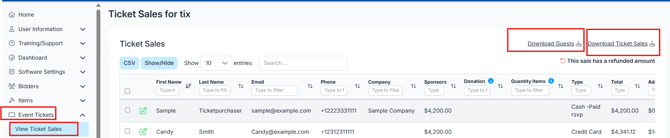
Navigate to Event Tickets > View Ticket Sales.
-
From here, you can download several different reports depending on your needs.
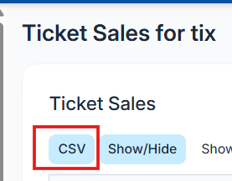
📁 CSV Report (Download Ticket Sales)
This report contains information about the actual ticket purchaser, note that guest details are not included here.
Includes:
-
First Name
-
Last Name
- Phone
-
Email
-
Address, City, State, Postal Code
-
Receipt Number
-
Discount Code & Discount Amount
-
Tickets, Sponsors, Underwriting, Donations
- Quantity Items
-
Ticket Type
-
Total & Admin Fee
👥 Guests Report
Download this report for detailed information about guests attending your event. Available via Event Tickets > View Ticket Sales > Download Guests.
Includes:
-
Guest First and Last Name
-
Phone & Email
-
Ticket Type
-
Date Purchased
-
Selection & Notes
-
Receipt Number
-
Purchaser’s First and Last Name
-
Purchaser Total
-
Form Name
Located in the top right of the view ticket sales page.

💳 Ticket Sales Report
This report offers a detailed breakdown of ticket purchases with payment and discount info.
Includes:
-
Purchaser First and Last Name
-
Address, City, State, Postal Code
-
Phone Number & Email
-
Total & Admin Fee
-
Receipt Number
-
Purchase Date
-
Payment Type
-
Donation Amount
-
Seating Request
-
Ticket Type and Name
-
Quantity & Price Per Unit
-
Discount Code, Price Each, and Total
-
Comments (Individual, Sponsorship, Underwriting)
-
Payout Date
-
Custom Question & Response
Located in the top right of the view ticket sales page
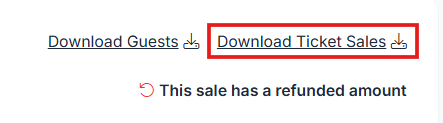
Note: Admin Discounts applied through the RSVP ticket page are applied to the total purchase, not to individual tickets. As a result, the Ticket Sales download (columns T, U, and V) will not display the discount as a code or on a per-ticket basis. Column J reflects the total amount after the Admin Discount has been applied to the overall transaction.
📝 Manage Guests Download
Available via Event Tickets > Manage Guests > Download Manage Guests.
Includes:
-
Purchaser First Name, Last Name, Company
-
Guest First and Last Name
-
Email & Phone
-
Selection
-
Bidder Number
-
Table Number
-
Ticket Type
-
Notes
Located at the top right of Manage Guests page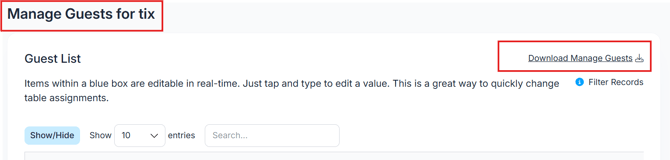
💡 Pro Tips
-
Use the CSV Report for purchaser-specific data useful in accounting and communication.
-
The Guests Report helps with seating and onsite check-in management.
-
The Ticket Sales Report provides a comprehensive overview including payments and discounts.
-
The Manage Guests report is perfect for tracking attendee details and bidder information.