
Get a complete overview of your event sales with the Ticket Sales Summary page. Here, you can review sales, discounts, guest details, and ticket specifics, all in one place.
What You’ll Find in the Ticket Sales Summary
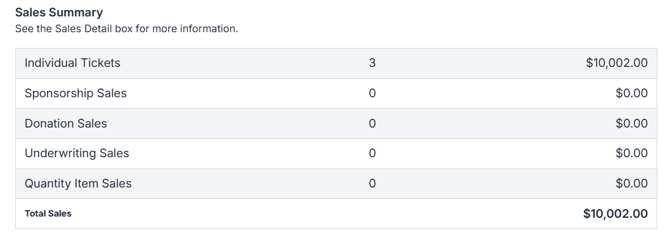
1. Sales Summary
-
Lists every ticket type you created under Event Tickets > Modify Tickets
-
Shows how many tickets sold for each type
-
Displays the total revenue generated from all tickets
2. Discounts
-
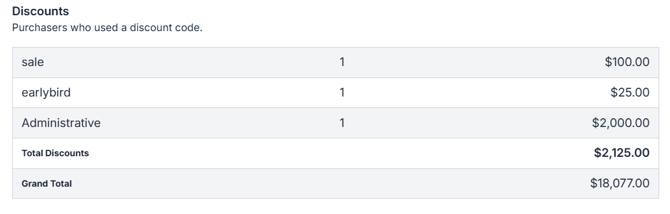
Displays all discount codes you’ve created on the left side
-
Shows the value of each discount code on the right side
-
Tracks how many times each discount has been used in the center
3. Guests
-
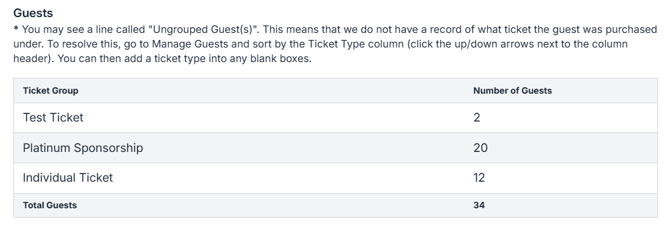
Shows individual ticket holders
-
Includes manual entries, assigned tables, and ungrouped guests
4. Table Assignments
-
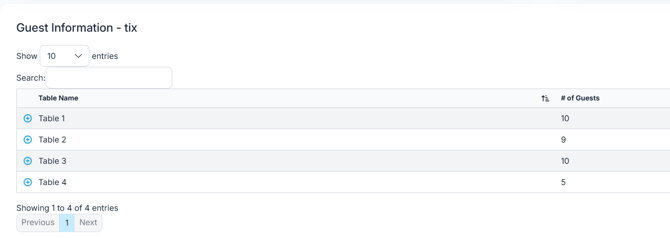
Shows all existing tables on the left side
- Lists the number of guests assigned to each table on the right side
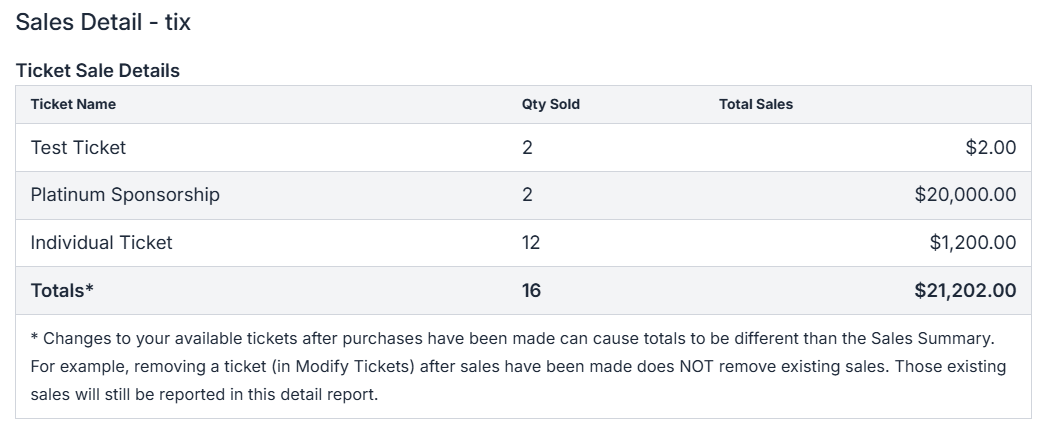
5. Ticket, Sponsorship & Underwriting Sale Details
-
Details the quantity sold for each ticket, sponsorship, or underwriting item
-
Shows total amounts for each category
💡 Pro Tip
Use this summary regularly to monitor your event’s progress and identify popular ticket types or discounts that drive sales.