
What Happens When You Delete Ticket Sales?
Removing ticket sales is a permanent action that deletes the guest records tied to those tickets and ensures you will not receive payment for them if deleted prior to a merchant payout. Use this tool responsibly.
Caution: Deleted ticket sales cannot be recovered, and any guests associated will also be removed from Event Tickets > Manage Guests.
⚠️Make sure you refund the ticket sale first before deleting
⚙️ How to Remove Ticket Sales
-
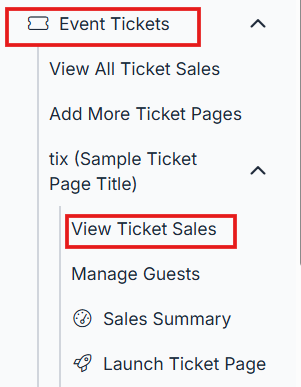
Go to the Event Tickets tab in the left menu, and click View Ticket Sales.
-
In the upper-left dropdown, select Show All Entries
This ensures you can view and act on the full list of sales.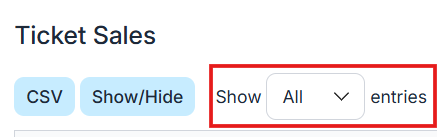
-
Select ticket sales you want to delete (make sure you refund the ticket purchase before deleting)
-
Use the top toggle box to select all or check boxes individually to choose specific entries.
-
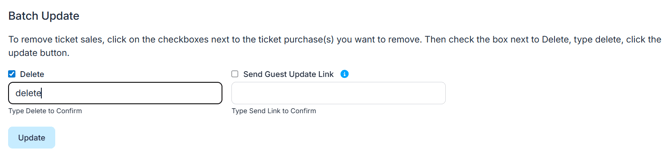
Select the Delete checkbox
-
A popup will ask you to type "Delete" to confirm the action
-
-
Click Update to finalize your deletion
-
Your ticket sales and associated guest data will now be removed
-
🟠 Warning: Only delete tickets if you're sure they are no longer needed. You won't be able to restore them or any related guest info.
To ensure reporting stays clean, always refund before deleting.