---
title: How to Set Up Discount Codes and Complimentary Tickets
description: Learn how to create complimentary or discounted tickets using discount codes in ClickBid. Easily offer free tickets, VIP access, or reduced pricing in just a few steps.
---
[Skip to content](https://support.cbo.io/-ticket-page-discount-codes#main-content)

- [Blog](https://blog.cbo.io/)
- [ClickBid Admin](https://cbo.io/admin/login.php)
Open main navigation
Close main navigation
- [Blog](https://blog.cbo.io/)
- [ClickBid Admin](https://cbo.io/admin/login.php)
- [View our Training Videos](https://training.clickbidonline.com/all-courses/)
[View our Training Videos](https://training.clickbidonline.com/all-courses/)
Welcome to ClickBid's Knowledge Base
- There are no suggestions because the search field is empty.
1. [ClickBid How To Articles](https://support.cbo.io/?hsLang=en)
2. [Tickets & Sponsorships](https://support.cbo.io/tickets-sponsorships?hsLang=en)
3. [Tickets, Sponsorships & Underwriting Overview](https://support.cbo.io/tickets-sponsorships?hsLang=en#tickets-sponsorships-underwriting-overview)
# How to Set Up Discount Codes and Complimentary Tickets
## Discount codes let you offer reduced-price or complimentary tickets without creating separate ticket types. This keeps your ticket page clean while still giving you the flexibility to offer special pricing for sponsors, staff, VIP guests, or any other group.
Discount codes let you offer reduced-price or complimentary tickets without creating separate ticket types. This keeps your ticket page clean while still giving you the flexibility to offer special pricing for sponsors, staff, VIP guests, or any other group.
---
#### Adding a Discount Code to a New Ticket
If you are creating a brand new ticket, the discount code section becomes available once the ticket name and price have been entered and the record saves for the first time.
1. Go to **Event Tickets \> Modify Tickets**.
2. Click **Add Ticket** for an individual ticket or **Add Sponsor Level** for a sponsorship.
3. Enter the **Ticket Name** and **Price**. The ticket saves automatically once both fields are filled in.
4. Scroll down to the **Discount Code** section and click **+ Discount Code**.
5. Then follow **Option A** or **Option B** below depending on what you are offering.
---
#### Adding a Discount Code to an Existing Ticket
1. Go to **Event Tickets \> Modify Tickets**.
2. In the **Individual Tickets** or **Sponsor Levels** table, click the **edit icon** next to the ticket you want to update.
1. 
3. Scroll down to the **Discount Code** section.
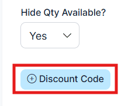
4. Click **+ Discount Code**.
1. 
5. Follow the steps in **Option A** or **Option B** below depending on whether you want a discounted price or a complimentary ticket.
💡Use clear, memorable codes like VIP, STAFF, or DONOR so they are easy to share and recognize.
---
#### Option A: Add a Discounted Price Code
Use this option when you want to offer a ticket at a reduced price.
1. Scroll down to the **Discount Code** section within the ticket form.
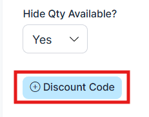
2. Click the **+ Discount Code** button.
1. 
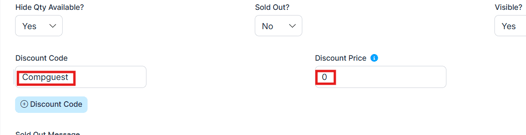
3. Enter your desired code in the **Discount Code** field. For example: VIP, STAFF, or SPONSOR2026.
4. Enter the **final ticket price** the guest will pay after the discount is applied in the **Discount Price** field. For example, if the ticket normally costs $100 and you want to charge $25, enter 25.
1. 
5. Changes save automatically view the **Data Saved** in the upper right of the page.
6. Click **Complete and Go Back** button in the upper right corner.
⚠️ Discount codes set the final price the guest pays, not the amount taken off. Always enter what you want the guest to be charged, not the discount amount. Double-check the price before sharing the code.
---
#### Option B: Add a Complimentary (Free) Ticket Code
Use this option when you want guests to receive a ticket at no cost, without creating a separate free ticket type.
1. Enter your desired code in the **Discount Code** field. For example: VIPFREE or COMP.
2. Enter **0** in the **Discount Price** field.
3. Changes save automatically.
Guests who enter this code during checkout will receive the ticket at no charge.
💡 Use clear, memorable discount codes like **VIP**, **STAFF**, or **DONOR** so they’re easy to share and recognize.
---
#### Adding Multiple Discount Codes to the Same Ticket
You can add as many discount codes as needed to a single ticket type. Each code can have a different final price, making it easy to manage multiple pricing levels from one ticket.
1. Click **+ Discount Code** again to add another row.
2. Enter a new code and its corresponding final price (or 0 for complimentary).
3. Repeat for as many codes as needed.
This allows you to offer different pricing levels (such as sponsor rates, early access pricing, or staff discounts).
💡 Create separate codes for different groups rather than sharing one code broadly. This makes it easier to track who used each discount and how many times it was redeemed.
---
#### Removing a Discount Code
To remove a discount code, click the red **delete icon** next to the code row you want to remove. Click **Complete and Go Back** button once you are finished.

---
### Things to Keep in Mind
- Discount codes apply **only to the ticket you add them to**.
- Guests must enter the **correct code during checkout** for the discount to apply.
- If a discounted ticket price is set to **0**, the ticket will be treated as **complimentary**.
⚠️ If the wrong price is entered in the **Discount Code** field, guests may be charged more or less than intended. Always double-check the final price before saving.
- [Account & Setup](https://support.cbo.io/account-setup?hsLang=en#main-content)
- [Users & Logging In](https://support.cbo.io/account-setup?hsLang=en#users-logging-in)
- [Billing/Renewal](https://support.cbo.io/account-setup?hsLang=en#billing-renewal)
- [Organization Account](https://support.cbo.io/account-setup?hsLang=en#organization-account)
- [Event Settings](https://support.cbo.io/account-setup?hsLang=en#event-settings)
- [Auction Settings](https://support.cbo.io/account-setup?hsLang=en#auction-settings)
- [Welcome Page](https://support.cbo.io/account-setup?hsLang=en#welcome-page)
- [Get Started](https://support.cbo.io/get-started?hsLang=en#main-content)
- [Pre-Event Prep](https://support.cbo.io/get-started?hsLang=en#pre-event-prep)
- [Creating a New Event](https://support.cbo.io/get-started?hsLang=en#creating-a-new-event)
- [Event Day Toolkit](https://support.cbo.io/event-day-toolkit?hsLang=en#main-content)
- [Paddle Raise](https://support.cbo.io/event-day-toolkit?hsLang=en#paddle-raise)
- [Live Auction](https://support.cbo.io/event-day-toolkit?hsLang=en#live-auction)
- [Silent Auction](https://support.cbo.io/event-day-toolkit?hsLang=en#silent-auction)
- [Butler](https://support.cbo.io/event-day-toolkit?hsLang=en#butler)
- [Volunteer Training](https://support.cbo.io/event-day-toolkit?hsLang=en#volunteer-training)
- [Messaging](https://support.cbo.io/messaging?hsLang=en#main-content)
- [Text & Emails](https://support.cbo.io/messaging?hsLang=en#text-emails)
- [Chat Bidders](https://support.cbo.io/messaging?hsLang=en#chat-bidders)
- [Welcome Text, Text Bidders, & Email Bidders](https://support.cbo.io/messaging?hsLang=en#welcome-text-text-bidders-email-bidders)
- [Tickets & Sponsorships](https://support.cbo.io/tickets-sponsorships?hsLang=en#main-content)
- [Tickets, Sponsorships & Underwriting Overview](https://support.cbo.io/tickets-sponsorships?hsLang=en#tickets-sponsorships-underwriting-overview)
- [Reporting & Data](https://support.cbo.io/tickets-sponsorships?hsLang=en#reporting-data)
- [Manage Ticketed Guests](https://support.cbo.io/tickets-sponsorships?hsLang=en#manage-ticketed-guests)
- [RSVP & Invoicing](https://support.cbo.io/tickets-sponsorships?hsLang=en#rsvp-invoicing)
- [Items](https://support.cbo.io/items?hsLang=en#main-content)
- [Items Overview & Setup](https://support.cbo.io/items?hsLang=en#items-overview-setup)
- [Quantity Items / E-Commerce](https://support.cbo.io/items?hsLang=en#quantity-items-e-commerce)
- [Item Donation Form and Donors](https://support.cbo.io/items?hsLang=en#item-donation-form-and-donors)
- [FMV & Tax](https://support.cbo.io/items?hsLang=en#fmv-tax)
- [Peer to Peer and Donation Campaigns](https://support.cbo.io/peer-to-peer-and-donation-campaigns?hsLang=en#main-content)
- [Peer to Peer and Donation Setup](https://support.cbo.io/peer-to-peer-and-donation-campaigns?hsLang=en#peer-to-peer-and-donation-setup)
- [Recurring Donations](https://support.cbo.io/peer-to-peer-and-donation-campaigns?hsLang=en#recurring-donations)
- [Text to Give](https://support.cbo.io/peer-to-peer-and-donation-campaigns?hsLang=en#text-to-give)
- [Embed Your Donation Form](https://support.cbo.io/peer-to-peer-and-donation-campaigns?hsLang=en#embed-your-donation-form)
- [Appeal Display](https://support.cbo.io/peer-to-peer-and-donation-campaigns?hsLang=en#appeal-display)
- [Bidders](https://support.cbo.io/bidders?hsLang=en#main-content)
- [Bidder Setup](https://support.cbo.io/bidders?hsLang=en#bidder-setup)
- [Donor Thank You Letters](https://support.cbo.io/bidders?hsLang=en#donor-thank-you-letters)
- [Bidder Registration Custom Questions](https://support.cbo.io/bidders?hsLang=en#bidder-registration-custom-questions)
- [Reporting & Data](https://support.cbo.io/reporting-data?hsLang=en#main-content)
- [Event Reporting](https://support.cbo.io/reporting-data?hsLang=en#event-reporting)
- [Credit Card Processing & Payments](https://support.cbo.io/credit-card-processing-payments?hsLang=en#main-content)
- [Credit Card Processing & Payments](https://support.cbo.io/credit-card-processing-payments?hsLang=en#credit-card-processing-payments)
- [FAQs](https://support.cbo.io/credit-card-processing-payments?hsLang=en#faqs)
- [Merchant Account & Merchant Report](https://support.cbo.io/credit-card-processing-payments?hsLang=en#merchant-account-merchant-report)
- [Web Content / Event Landing Pages](https://support.cbo.io/web-content-event-landing-pages?hsLang=en#main-content)
- [Design & Customization](https://support.cbo.io/web-content-event-landing-pages?hsLang=en#design-customization)
- [Accepting Donations From Your Landing Page](https://support.cbo.io/web-content-event-landing-pages?hsLang=en#accepting-donations-from-your-landing-page)
- [EventStream Video Streaming](https://support.cbo.io/eventstream-video-streaming?hsLang=en#main-content)
- [Virtual Live Auction and Paddle Raise](https://support.cbo.io/eventstream-video-streaming?hsLang=en#virtual-live-auction-and-paddle-raise)
- [EventStream FAQ](https://support.cbo.io/eventstream-video-streaming?hsLang=en#eventstream-faq)
- [Integrations + Partners](https://support.cbo.io/integrations-partners?hsLang=en#main-content)
- [Neon One](https://support.cbo.io/integrations-partners?hsLang=en#neon-one)
- [Raiser's Edge NXT](https://support.cbo.io/integrations-partners?hsLang=en#raisers-edge-nxt)
- [Bloomerang](https://support.cbo.io/integrations-partners?hsLang=en#bloomerang)
- [Salesforce for Nonprofits](https://support.cbo.io/integrations-partners?hsLang=en#salesforce-for-nonprofits)
- [Charityproud](https://support.cbo.io/integrations-partners?hsLang=en#charityproud)
- [Classy](https://support.cbo.io/integrations-partners?hsLang=en#classy)
- [TravelPledge](https://support.cbo.io/integrations-partners?hsLang=en#travelpledge)
- [Double the Donation](https://support.cbo.io/integrations-partners?hsLang=en#double-the-donation)
- [HGA Fundraising](https://support.cbo.io/integrations-partners?hsLang=en#hga-fundraising)
- [Public API](https://support.cbo.io/integrations-partners?hsLang=en#public-api)
- [Zapier](https://support.cbo.io/integrations-partners?hsLang=en#zapier)
- [Virtuous](https://support.cbo.io/integrations-partners?hsLang=en#virtuous)
- [Charity Experiences](https://support.cbo.io/integrations-partners?hsLang=en#charity-experiences)
- [Donorperfect](https://support.cbo.io/integrations-partners?hsLang=en#donorperfect)
- [Little Green Light](https://support.cbo.io/integrations-partners?hsLang=en#little-green-light)
- [FAQs](https://support.cbo.io/faqs?hsLang=en#main-content)
- [FAQs](https://support.cbo.io/faqs?hsLang=en#faqs)
[](https://try.cbo.io)
ClickBid Training Hub
Copyright © 2026, ClickBid Event Fundraising
```json
{
"@context" : "https://schema.org",
"@type" : "VideoObject",
"caption" : {
"@type" : "MediaObject",
"contentUrl" : "https://support.cbo.io/media-transcripts/218300153993/en.vtt",
"inLanguage" : "en",
"name" : "en Captions"
},
"contentUrl" : "https://22025730.fs1.hubspotusercontent-na1.net/hubfs/22025730/video_assets/218300153993/inherited/web_optimized.mp4",
"dateModified" : "2026-07-29T19:21:18.752Z",
"duration" : "PT3M28S",
"height" : 1080,
"name" : "Discount Codes & Complimentary Tickets",
"thumbnailUrl" : "https://22025730.fs1.hubspotusercontent-na1.net/hubfs/22025730/Discount%20Codes%20&%20Complimentary%20Tickets.mp4/medium.jpg",
"uploadDate" : "2026-07-29T19:21:00.446Z",
"width" : 1920
}
```