
🌐 Your Event Site & Sharing Tools
At the top of the Welcome Page, you’ll find everything you need to share your event with guests.
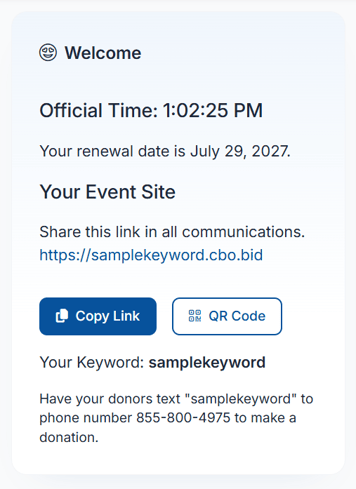
😁Welcome
-
Official System Time (used for bidding and closing rules)
-
Your renewal date for ClickBid
-
Event Site Link:
-
This is your public event URL
-
Share it in emails, texts, and social media
-
-
Copy Link:
-
Quickly copy the URL for sharing
-
-
QR Code:
-
Guests can scan to access your event instantly
-
-
Event Keyword:
-
A short keyword guests can use to find your event
-
-
Text-to-Give Instructions:
-
Guests can text your keyword to 855-800-4975 to make a donation
-
Share the event link and QR code on signage, programs, and screens to make it easy for guests to participate.
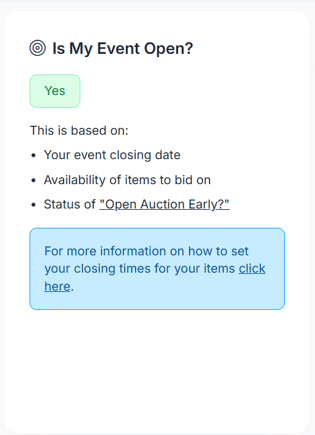
🟢 Is My Event Open?
This section confirms whether your event is currently open to guests.
-
Event Open Status: Yes or No
-
This status is based on:
-
Your event closing date
-
The availability of items to bid on
-
Whether Open Auction Early is enabled
-
If your event isn’t open when expected, double-check your item closing times and auction settings.
📅 Important Dates
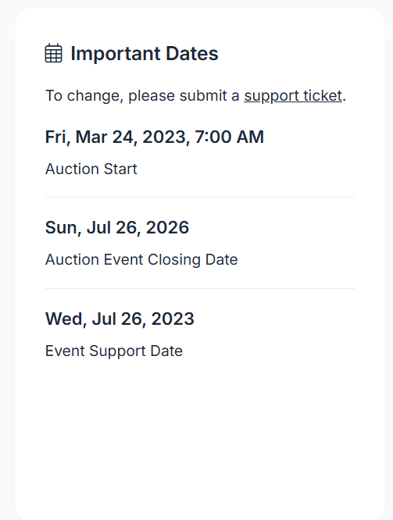
The Important Dates section shows key milestones for your event, including:
-
Auction Start Date & Time
-
Auction Event Closing Date
-
Event Support Date
To change these dates, you’ll need to submit a support ticket. These dates can’t be edited directly from the Welcome Page.
💰 Event Totals Snapshot
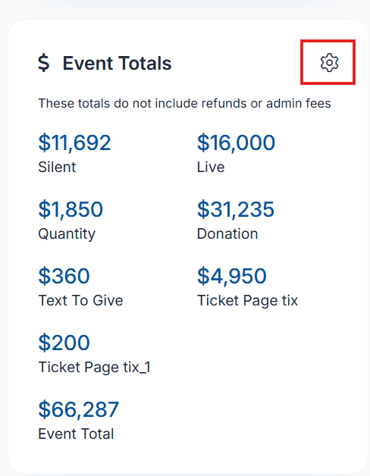
This section displays your event’s fundraising totals at a glance.
Totals shown:
-
Silent Auction
-
Live Auction
-
Quantity Items
-
Donations
-
Text to Give
-
Ticket Page Sales
-
Event Total
Totals shown here do not include refunds or admin fees.
📦 Item Information Overview
Here you can see how many items are included in your event, broken down by type:
-
Silent Items
-
Live Items
-
EventStream Items (if you have the full suite license)
-
Quantity Items
-
Donation Items
-
Blind Items
-
Total Items
This helps you quickly confirm that all expected items are set up correctly.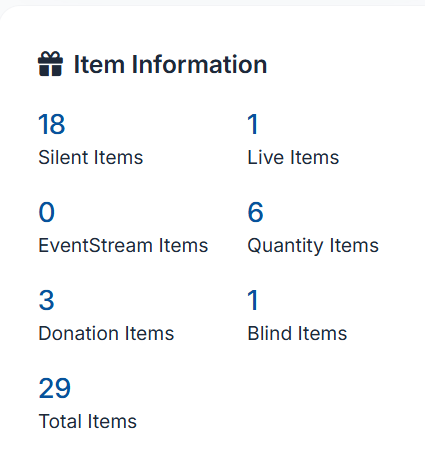
👥 Bidder Information Summary
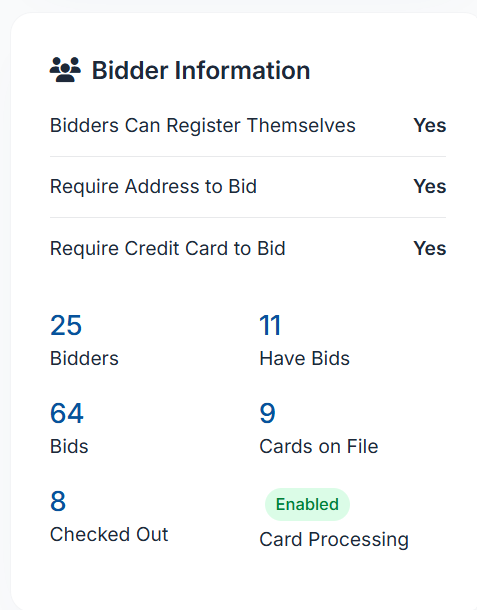
The Bidder Information section shows how guests are interacting with your event.
Registration & Requirements
-
Bidders Can Register Themselves: Yes / No
-
Require Address to Bid: Yes / No
-
Require Credit Card to Bid: Yes / No
Participation Stats
-
Total Bidders
-
Bidders with Bids
-
Total Bids Placed
-
Cards on File
-
Checked Out Bidders
- Card Processing: Enabled or Disabled
- This confirms whether your event is currently able to process credit card payments
If bidding seems low, this section can help you quickly see whether guests have registered or added payment methods.
🤖 AuctionGPT Insights (Beta)
The AuctionGPT Insights section allows you to ask questions about your event data and performance.
-
Ask questions like:
-
“How many bidders haven’t checked out?”
-
“What items are getting the most bids?”
-
AuctionGPT Insights is currently in Beta, and responses are based on available event data.
🧑💼 Account Manager & Support
Your event may have an assigned Account Manager who helps support your organization.
-
Your Account Manager can assist with questions about setup, best practices, and event readiness.
-
You can also submit support questions directly through ClickBid if you need help or have technical issues.
If you’re unsure who your Account Manager is, submitting a support ticket is the fastest way to get connected with the right person.
🔁 Rotating Resource Carousel
The Resource Carousel highlights helpful tools available to your organization. This section automatically rotates through featured resources, giving you quick access to additional support and learning opportunities.
You may see links and information for:
-
TravelPledge: Tools and options related to sustainable travel and donor experiences
-
HGA: Helps organizations raise more money by providing ready-to-sell trips and experiences for auctions and raffles, with simple setup and full donor fulfillment.
-
Training Hub: ClickBid training guides, videos, and educational content
The carousel rotates automatically, so check back often to see new or updated resources as they become available.
✅ Summary
The Welcome Page is your command center in ClickBid. It helps you monitor event status, track fundraising totals, confirm bidder activity, and quickly access sharing tools, all without digging through multiple menus.