
🔗 Connection
To connect a ClickBid event to your Raiser's Edge NXT account, go to Integrations > Dashboard. You will see a Raiser's Edge NXT card with the description "Send sales and bidder data to your existing Raiser's Edge NXT account" and a Connect button to start the process.
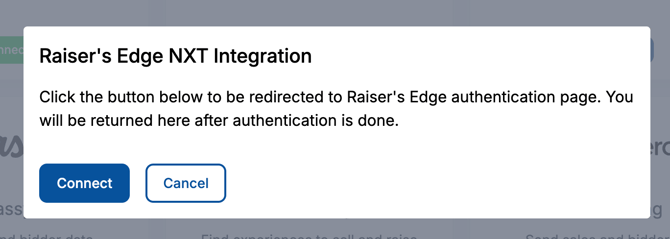
Raiser's Edge uses OAuth for authentication, so there's no API key or Organization ID to copy. When you click Connect, you'll be redirected to the Raiser's Edge authentication page to sign in and approve the connection. After you authorize, you'll be returned to ClickBid and the card will show a blue Connected button.
To disconnect at any time, return to the Raiser's Edge NXT card and click Remove. You can reconnect again later by repeating the authentication flow.
ℹ️ You must have a Raiser's Edge NXT account with permission to authorize third-party apps. If your sign-in does not have those rights, ask your Blackbaud admin to complete the connection.
⚙️ Settings
This is your starting point for the integration, configure how and when data flows between ClickBid and Raiser's Edge NXT.
Go to Integrations > Raiser's Edge NXT > Settings.
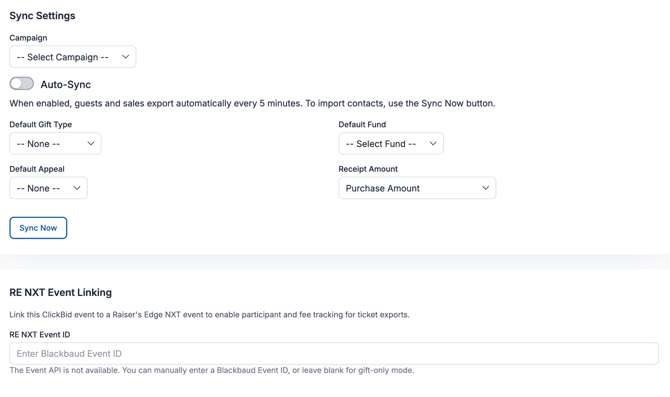
Sync Settings
- Campaign: Select which Raiser's Edge campaign this event is tied to. Sales and bidder data will be associated with this campaign when exported.
- Auto-Sync: When enabled, guests and sales export to Raiser's Edge automatically every 5 minutes. To import contacts, use the Sync Now button.
- Default Gift Type: The gift type applied to exported sales: Donation, Pledge, Recurring Gift, or Other.
- Default Fund: The Raiser's Edge fund all exported gifts should be credited to.
- Default Appeal: The Raiser's Edge appeal to associate with exported gifts.
- Receipt Amount: Choose how the sale amount is recorded in Raiser's Edge:
- Purchase Amount: Records the entire purchase amount as the gift value.
- Purchase Amount minus FMV: Records only the tax-deductible portion of the sale.
- Sync Now: Triggers a manual sync immediately. Use this if you need to push data right away rather than waiting for the next auto-sync cycle.
💡Set Campaign, Fund, and Appeal defaults before your event begins so exports are categorized correctly in Raiser's Edge from the start.
RE NXT Event Linking
Link this ClickBid event to a Raiser's Edge NXT event to enable participant and fee tracking for ticket exports.
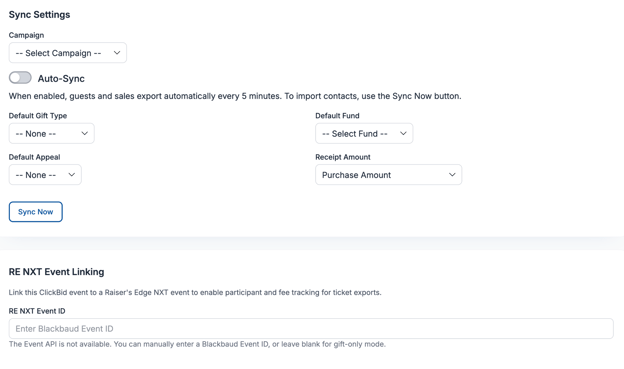
- RE NXT Event: Select the matching Raiser's Edge event from the dropdown. Choose None (Gift only) if you do not want to attach guests as event participants and only want gift records exported.
ℹ️ Info: When an RE NXT event is linked, guests you push from Export Guests will be added as participants on that event in Raiser's Edge.
Constituent Details
Configure how new Raiser's Edge constituents are created when exporting from ClickBid.
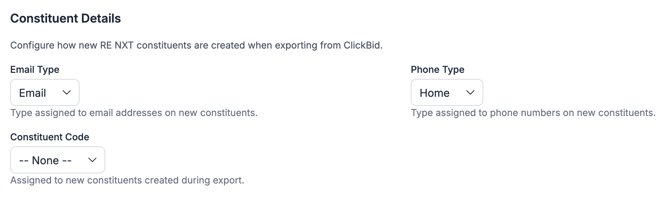
- Email Type: The type assigned to email addresses on new constituents.
- Phone Type: The type assigned to phone numbers on new constituents.
- Constituent Code: The constituent code assigned to new constituents created during export.
Post-Event Attendee Data Sync
Send ClickBid attendee post-event data to Raiser's Edge NXT constituent custom field categories. This data should be sent after your event to get the most accurate information.
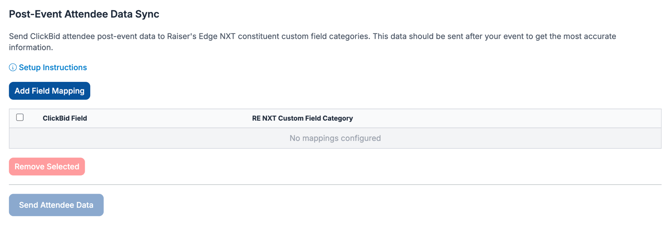
- Setup Instructions: Opens step-by-step guidance for preparing the custom field categories in Raiser's Edge.
- Add Field Mapping: Creates a new row mapping a ClickBid Field to an RE NXT Custom Field Category.
- Remove Selected: Deletes a selected mapping from the list.
- Send Attendee Data: Pushes attendee summaries into the mapped Raiser's Edge custom field categories.
⚠️ Do not use Send Attendee Data until your event has ended and all auction item and donation checkouts are fully complete. Running this too early may result in incomplete records in Raiser's Edge.
🗺️ Data Mappings
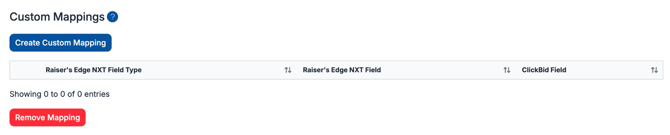
Data Mappings let you route specific ClickBid fields into custom fields you've already set up in Raiser's Edge NXT.
Go to Integrations > Raiser's Edge NXT > Data Mappings.
Custom Mappings
To create a custom mapping, click Create Custom Mapping and choose the Raiser's Edge NXT Field Type, the Raiser's Edge NXT Field, and the corresponding ClickBid Field. To remove a mapping, check the box next to it and click Remove Mapping.
ℹ️ Info: Custom fields must already exist in Raiser's Edge NXT before you can map to them. Set up any needed custom fields in Raiser's Edge first, then return here to create the mapping.
💡 Account-level field defaults like: Phone Type, Email Type, and Constituent Code, are configured under Settings > Constituent Details, not here.
📥 Import Bidders
Import Bidders lets you pull your existing Raiser's Edge NXT constituents into ClickBid as bidders so they don't have to register themselves.
Go to Integrations > Raiser's Edge NXT > Import Bidders.
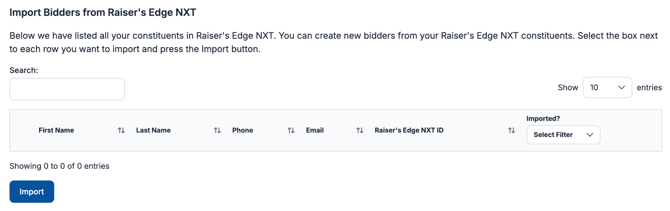
ClickBid displays all constituents from your connected Raiser's Edge account. You can filter by event and search by name or email to find specific donors.
- Select the Event you want to pull constituents from using the dropdown.
- Use the Search field to filter the list if needed.
- Check the box next to each constituent you want to import.
- Click Import.
ℹ️ The Imported? column shows which constituents have already been brought into ClickBid, so you can avoid creating duplicates.
📤 Export Bidders
Export Bidders sends your ClickBid bidder records to Raiser's Edge NXT, either as new constituents or linked to existing ones.
Go to Integrations > Raiser's Edge NXT > Export Bidders.
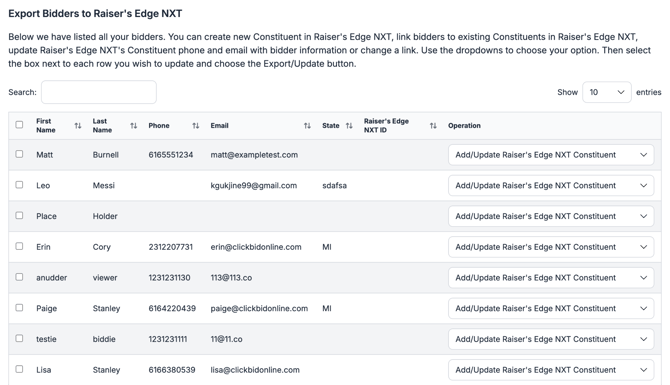
ClickBid lists all bidders in your event. For each bidder, use the Operation dropdown to choose what action to take:
- Link to Existing Raiser's Edge NXT Constituent: Connects this bidder to a constituent record that already exists in Raiser's Edge.
- Update Raiser's Edge NXT Constituent Email: Updates the email address on the linked Raiser's Edge record with the bidder's current email.
- Update Raiser's Edge NXT Constituent Phone: Updates the phone number on the linked Raiser's Edge record.
- Update Both Phone & Email: Updates both contact fields at once.
- Remove Link: Disconnects this bidder from their linked Raiser's Edge record.
- Add/Update Raiser's Edge NXT Constituent: Creates a new constituent if no match is found, or updates the linked constituent if one already exists.
Once you've set the operation for each bidder you want to act on, check the boxes next to those rows and click Export/Update.
💡 Use Add/Update Raiser's Edge NXT Constituent as your default when you're not sure if a match exists: Raiser's Edge will create the record if needed and update it if it already exists.
💡 Bidders who were imported from Raiser's Edge will already have a Raiser's Edge NXT ID and won't need to be exported as new constituents.
💰 Export Sales
Export Sales sends completed auction sales and donations from ClickBid into Raiser's Edge NXT as gift records.
Go to Integrations > Raiser's Edge NXT > Export Sales.
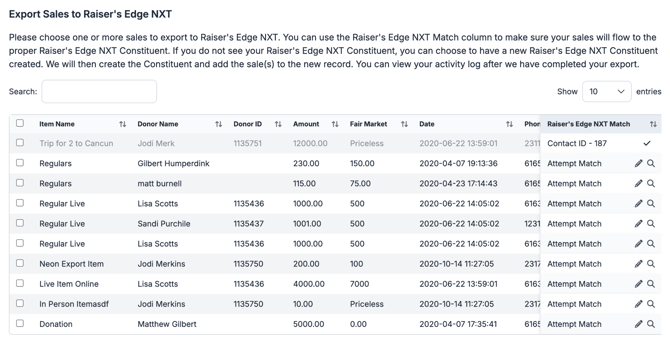
ClickBid lists all sales from your event, including the item name, donor name, donor ID, amount, fair market value, date, phone, email, and pay type. The Raiser's Edge NXT Match column shows whether a Raiser's Edge constituent has been identified for that donor.
- Review the Raiser's Edge NXT Match column. If an existing Raiser's Edge constituent is shown, the sale will be added to that record. If no match is found, ClickBid will create a new Raiser's Edge constituent for that donor when you export.
- Check the box next to each sale you want to export.
- Click Export Sales.
To reset previously exported sales so they can be exported again, click Clear Export(s) and confirm in the dialog.
💡 Any defaults you set under Settings (Campaign, Default Gift Type, Default Fund, Default Appeal, Receipt Amount) will be applied automatically to each sale you export here.
⚠️ Warning: After exporting, use the Activity Log to confirm all records were processed successfully before closing out your event.
🪑 Export Guests
Export Guests sends your event ticket holders to Raiser's Edge NXT as constituents, and, if you've linked an RE NXT event, as event participants too.
Go to Integrations > Raiser's Edge NXT > Export Guests.
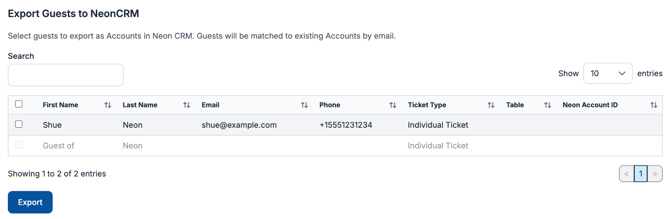
ClickBid displays your event guests with their first name, last name, email, phone, ticket type, table assignment, and Constituent ID. Attendees are matched to existing constituents using your matching settings. Attendees will also be added as participants to the linked RE NXT event.
- Check the box next to each guest you want to export.
- Click Export.
ℹ️ Info: This feature is designed for event ticket holders (guests), not bidders. Use Export Bidders for your auction participants. If a guest's email matches an existing constituent, the guest will be linked to that constituent rather than creating a duplicate.
💡 Tip: Make sure you've set the RE NXT Event under Settings > RE NXT Event Linking if you want guests added as participants in Raiser's Edge, otherwise constituents are created or matched without an event participation record.
📋 Activity Log
The Activity Log gives you a complete record of everything that has been sent to Raiser's Edge NXT from ClickBid.
Go to Integrations > Raiser's Edge NXT > Activity Log.
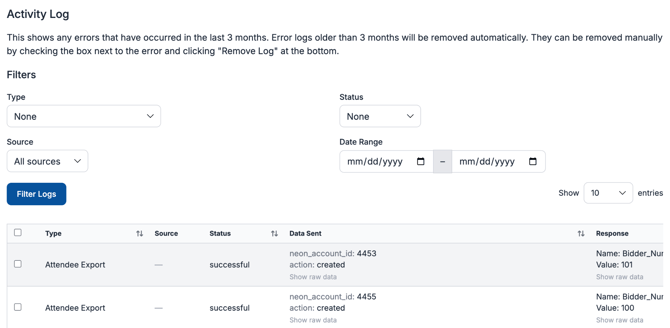
Each entry shows the Type of action, the Source (Auto Sync or Manual), the Status (Successful, Failure, or Pending), the Data Sent, Raiser's Edge's Response, and the Date. Click Show raw data on any row to expand the full payload for that entry.
You can filter log entries using the controls at the top of the page:
- Type: Bidder Export, Custom Field Export, Sale Export, Bidder Import, Auto Sync, Recurring Donation Sync, Attendee Export, Collection Sync, Attendee Custom Field Sync, or Sale Export Cleared.
- Status: Successful, Failure, or Pending.
- Source: All sources, Auto Sync, or Manual.
- Date Range: Limit results to a specific window.
Click Filter Logs to apply your selections.
Log entries are kept for 3 months and then removed automatically. You can also remove entries manually by selecting them and clicking Remove Log.
ℹ️ If an export shows a Failure status, check the Response column for details. Common causes include a missing constituent match, a required default that wasn't set under Settings, or a custom field category that hasn't been built in Raiser's Edge.
🚫 Common Connection Issues
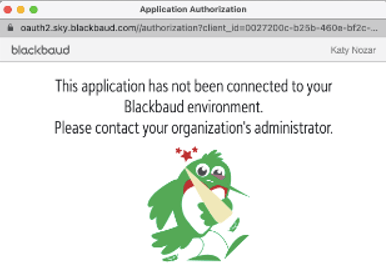
If You See a Blocked Connection Message:
-
Log in to your Blackbaud account.
-
Go to the Marketplace, search for ClickBid.
-
Click Get Started and follow the prompts.
If You See This Error:
"The table 'Phone Types' does not contain an active entry named 'Home'"
-
In Raiser's Edge: Config > Tables > Phone Types
-
Add or edit a table entry to include Home as a valid type.
-
Save and try your export again.
✅ Summary
The Raiser's Edge NXT integration gives you a complete toolset for connecting your ClickBid event to your donor database, before, during, and after your event. You can import existing constituents as bidders, keep records in sync automatically throughout the evening, and push all sales, guest data, and attendee participation back to Raiser's Edge when the event wraps up. The Activity Log makes it easy to verify that everything transferred correctly.